
Download TrackThisForMe – Track Your Weight, Mood, Sleep, Coffee & Biking
Overview
TrackThisForMe is a lightweight desktop application designed to help users monitor a wide range of personal metrics, from sleep duration and daily mood to physical activity like biking and dietary habits such as coffee consumption. The software enables users to maintain a consistent record of their daily routines, supporting self-awareness and long-term health tracking. It is particularly useful for individuals aiming to understand patterns in their lifestyle, such as how sleep quality affects mood or how caffeine intake correlates with energy levels. The application is accessible across multiple platforms, including Windows, Mac, and Linux, making it suitable for a broad audience of personal productivity enthusiasts and health-conscious users.
While the developer did not provide detailed background information, the software’s simplicity and free availability suggest a focus on accessibility and ease of use. Real-world usage scenarios include daily journaling for mental wellness, fitness tracking for workout consistency, and habit formation through visual progress reports. The tool also supports cross-device functionality via a web interface, allowing users to input data using a smartphone browser at any time, which enhances flexibility for on-the-go tracking.
Key Features & Capabilities
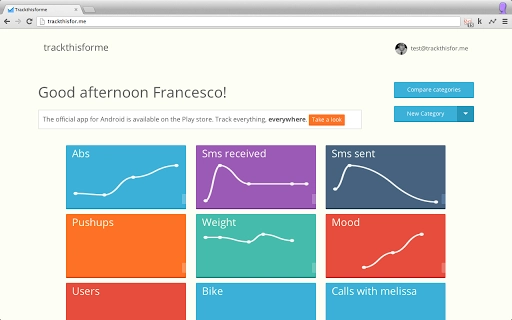
- Customizable Tracking Categories – Users can log various personal metrics, including sleep hours, mood, weight, workout sessions, biking distance, and number of coffee mugs consumed.
- Web-Based Synchronization – A mobile-friendly web interface at trackthisfor.me allows data entry from smartphones, ensuring continuous tracking regardless of device availability.
- Simple, Intuitive Interface – Designed for minimal learning curve, the desktop app supports quick data input with minimal clicks or navigation.
- Free to Use – The software is available at no cost, removing financial barriers to consistent personal tracking.
- Cross-Platform Support – Compatible with Windows, Mac, and Linux, enabling users to maintain a unified tracking experience across operating systems.
These features empower users to create personalized tracking systems. For example, someone aiming to improve sleep hygiene can log nightly hours and mood, later analyzing trends to identify contributing factors. Similarly, a fitness enthusiast might use the app to monitor biking distance and workout frequency, helping to maintain motivation and consistency. The integration with a web browser on mobile devices ensures that data can be recorded even when away from the desktop, promoting habit continuity.
User Interface, Workflow & Performance
The user interface of TrackThisForMe is designed with simplicity in mind, emphasizing clarity and minimal distractions. Navigation is straightforward, allowing users to select a tracked metric and enter data with a few clicks. The layout is likely optimized for quick access to frequently used categories, reducing the time needed to log daily entries. Workflow efficiency is enhanced by the ability to input data in a single session, with no need for complex setup or configuration.
Performance details were not specified by the developer. However, given the application’s lightweight nature and focus on basic data logging, it is expected to operate smoothly on standard desktop systems. The developer did not specify resource usage details, but the application’s size of 100 MB suggests it is not resource-intensive. Stability is likely maintained through consistent updates and a lightweight codebase, though specific performance metrics are unavailable. Users can expect responsive behavior during routine operations, with no indication of lag or crashes based on available information.
Compatibility & System Requirements
TrackThisForMe is compatible with Windows, Mac, and Linux operating systems, offering broad accessibility across desktop environments. The software version is 1.0, with a file size of 100 MB, indicating a modest installation footprint. This size suggests the application does not require extensive system resources, making it suitable for older or low-spec machines.
Exact system requirements were not listed by the developer. Compatibility information was partially provided, and users are advised to ensure their system meets general desktop software standards. The application does not require specific hardware beyond standard input devices such as a keyboard and mouse. For users with limited storage or older systems, the 100 MB size is favorable. The web-based component at trackthisfor.me further reduces dependency on local system specs, allowing access from virtually any internet-connected device.
Pros and Cons
Pros
- Free to download and use with no hidden costs
- Supports a wide range of personal tracking categories
- Accessible via mobile browser for on-the-go data entry
- Available on Windows, Mac, and Linux platforms
- Simple interface with minimal learning curve
Cons
- Exact system requirements were not specified
- No built-in reporting or analytics features were mentioned
- Performance details were not provided by the developer
- Dependent on internet connectivity for web synchronization
- Limited customization options for visual data presentation
FAQ Section
Is TrackThisForMe available for Windows, Mac, and Linux?
Yes, the software is compatible with Windows, Mac, and Linux operating systems, ensuring broad desktop accessibility.
Can I use TrackThisForMe without an internet connection?
The desktop application can be used offline for data entry, but synchronization with the web interface at trackthisfor.me requires an active internet connection.
Is the software secure and private?
The developer did not provide specific details about data security or privacy policies. Users should exercise caution when entering sensitive personal information.
How often are updates released?
Update frequency was not specified by the developer. The current version is 1.0, and users are encouraged to check for new releases via the official website.
What kind of license does TrackThisForMe use?
The software is offered for free, but the specific license type was not disclosed by the developer.
Final Thoughts + CTA
TrackThisForMe delivers a straightforward, no-frills solution for individuals seeking to track personal habits and lifestyle metrics. Its broad compatibility, free access, and web integration make it a practical tool for anyone committed to self-monitoring and habit improvement. While advanced analytics and detailed reporting are not highlighted, the app excels in simplicity and cross-device usability. For users who value minimalism and consistent data logging, TrackThisForMe stands out as a reliable desktop utility. Its ability to sync across devices via a mobile browser adds significant flexibility, enhancing daily usability.
Download TrackThisForMe now







